Dashboard Views
The web dashboard has fifteen views, reachable from the left nav rail (or the mobile bottom tab bar). Each is described below with its screenshot. See Dashboard Overview for launching, routes, refresh cadences, and security.
Overview
Route: /
Overview is the operator-first landing page. It combines local Gitmoot state into five compact blocks without making GitHub requests or scanning job payloads on each refresh:
- Fleet activity strip answers whether the host is busy even when session work has no engine job: sessions working, live sessions, blocked/input-pending sessions, running jobs, and unresolved escalations are counted separately. It links each count to the relevant read-only view and labels Herdr-down and healthy-with-no-sessions states rather than rendering either as zero silently.
- Needs you collects stalled workflows, pull-request tasks awaiting merge, and blocked jobs. Stalled workflow cards include the coordinator pane, session id, and last journal note needed to resume in the right place.
- Live fleet activity groups running and queued jobs by explicit workflow, with unlabeled work summarized separately and the total queued count visible.
- Today is a rolling 24-hour summary of terminal jobs, token usage, an hourly completion histogram, and the five most recently finished jobs.
- Scheduled shows enabled interval pipelines, their latest status, and the next run computed from the durable schedule state.
- Fleet lists registered agents with runtime, running state, and jobs started in the rolling 24-hour window.
The page is read-only and polls every 12 seconds; no dashboard request walks artifact directories.
Org
Route: /org
Org preserves the role hierarchy as its primary tree canvas and decorates each fixed-height node with live Herdr session data: a shape-and-color status marker, the pane's stripped terminal title, and a tabular turn-age badge. Working, blocked, and input-pending states also use motion unless the browser requests reduced motion; edges inherit the child session state. Filtering dims unmatched nodes without replacing the tree, and a no-match filter explains why the canvas looks empty.
Selecting a node opens the existing right-hand detail drawer while the tree remains visible. It shows the full task title, current turn and inferred age, last-completed turn and UTC time, agent/pane identity, role scope, and configured wake routes. Herdr currently lacks a current-turn start timestamp, so active-turn age is explicitly inferred from the preceding turn's completion. A role with no active agent session and an unavailable Herdr source are separate labeled states. Titles and statuses are shown, but transcript content is never exposed.
Tasks
Route: /tasks
Tasks is a read-only lifecycle board backed by Gitmoot's task registry. Internal states are projected into implementing, PR open, blocked, and merged columns; planned and unknown states are omitted, review, changes-requested, and ready-to-merge tasks remain in PR open, and awaiting-human tasks appear as blocked. Dismissed tasks are excluded by the server-side query, and task-event cursor invalidation removes a newly dismissed card immediately. Merged history is limited server-side to the last seven days.
Cards carry the task title, repository, assigned branch-lock owner when one is known, pull-request number, last-update age, and a blocked reason. The CI dot is hidden when Gitmoot has no locally persisted CI conclusion; opening Tasks never causes a per-request GitHub API call. Search and repo/agent filters are applied client-side to the deterministic server ordering.
Graph
Route: / (or /?run=<id>)
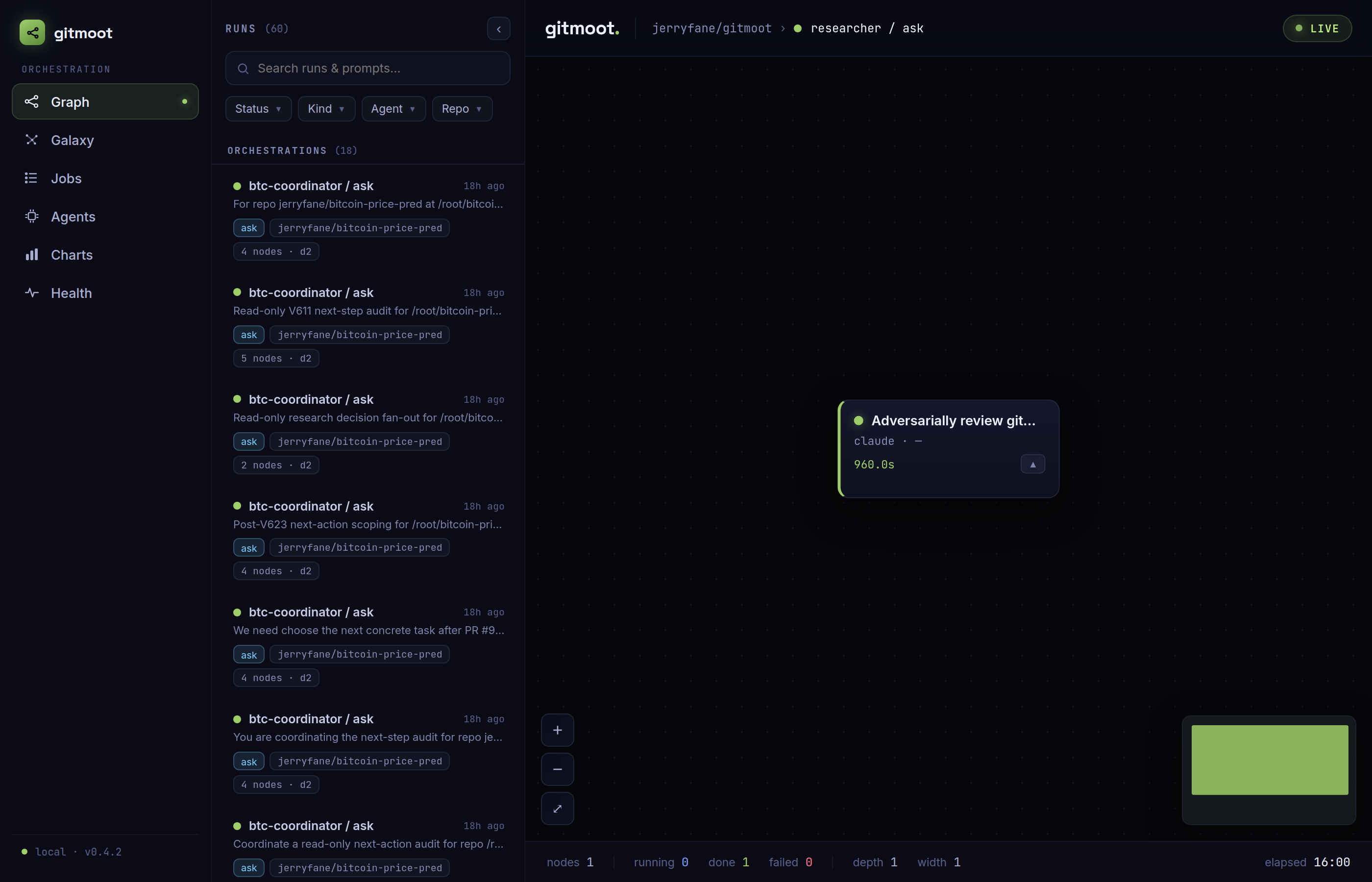
The Graph view is a single run's delegation DAG. Nodes are the jobs in that run's tree; edges are delegation parentage plus each child's declared dependencies resolved to its sibling jobs. Node color tracks state, and the selected run streams over SSE — running nodes pulse and settle live.
- Runs column (left): every orchestration run, active (running/queued) runs
first. A search box matches over run title and prompt snippet, and facets
filter by status, kind, agent, and repo (AND across categories, OR within
one). Selecting a run loads its graph and updates the URL to
/?run=<id>. - Node detail aside (right): click a node to open its prompt, output, event timeline, agent/runtime/model, state, depth, and a link to its pull request when one exists.
Galaxy
Route: /galaxy
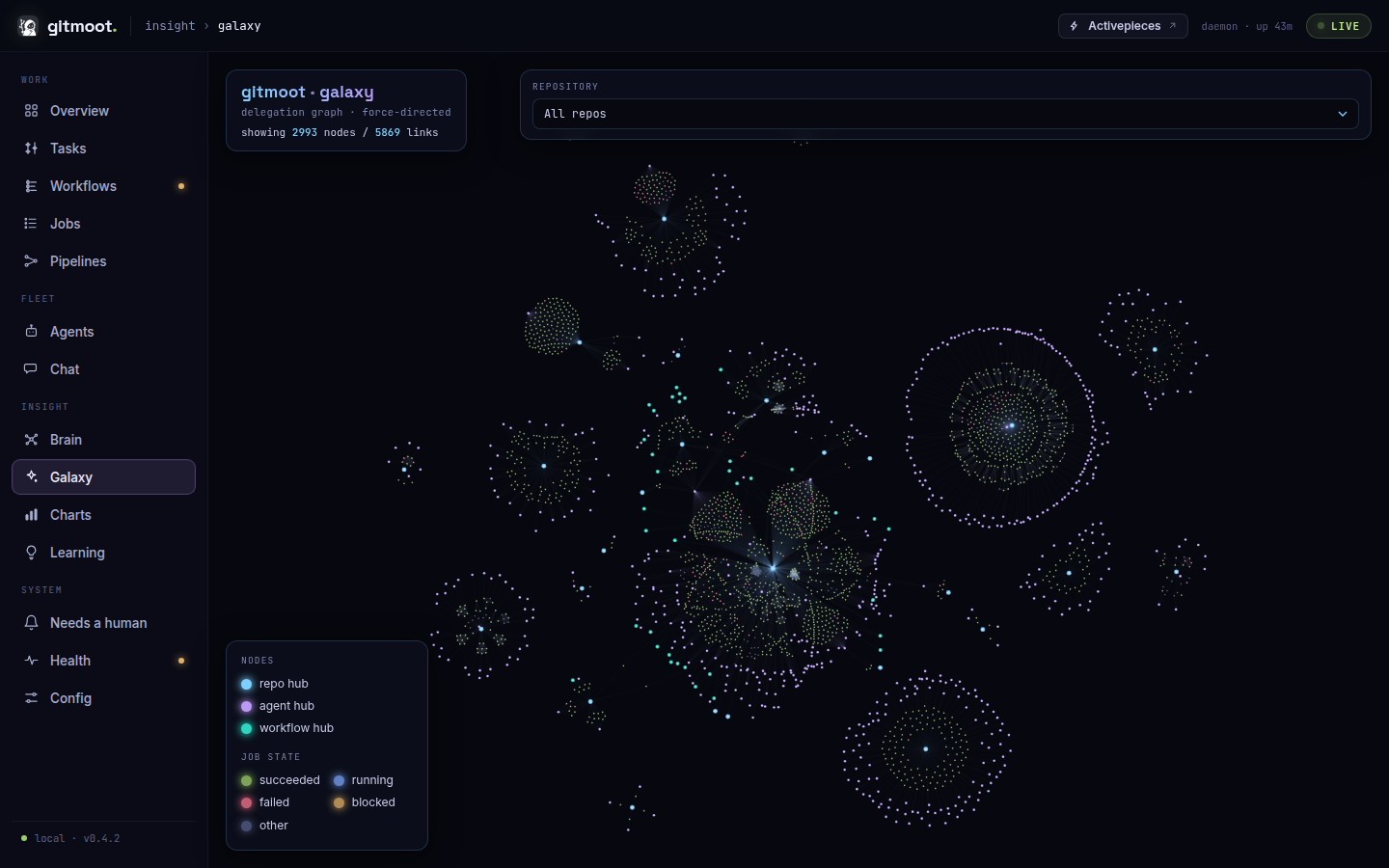
Galaxy is the whole-history force graph — every job across every run in one canvas, clustered around synthetic repo and agent hub nodes. Links are delegation parentage, a per-parent sibling mesh (capped so one huge fan-out can't dominate the density), and job-to-repo / job-to-agent spokes.
- Running jobs render as live beacons (floored to a minimum on-screen size so they stay visible when zoomed out) and pulse.
- Flowing particles travel the links touching a running job (bright and fast), with a subtle slow particle on ordinary delegation links, so active work is legible from the zoomed-out view.
- A repository filter scopes the visible jobs and their hubs to one repo; the filter list always stays complete regardless of the current scope.
- Clicking a node opens the same detail panel (pinned right on desktop, a full-screen sheet on mobile). A readout shows how many nodes and links are currently drawn.
Jobs
Route: /jobs (or /jobs?agent=<name>)
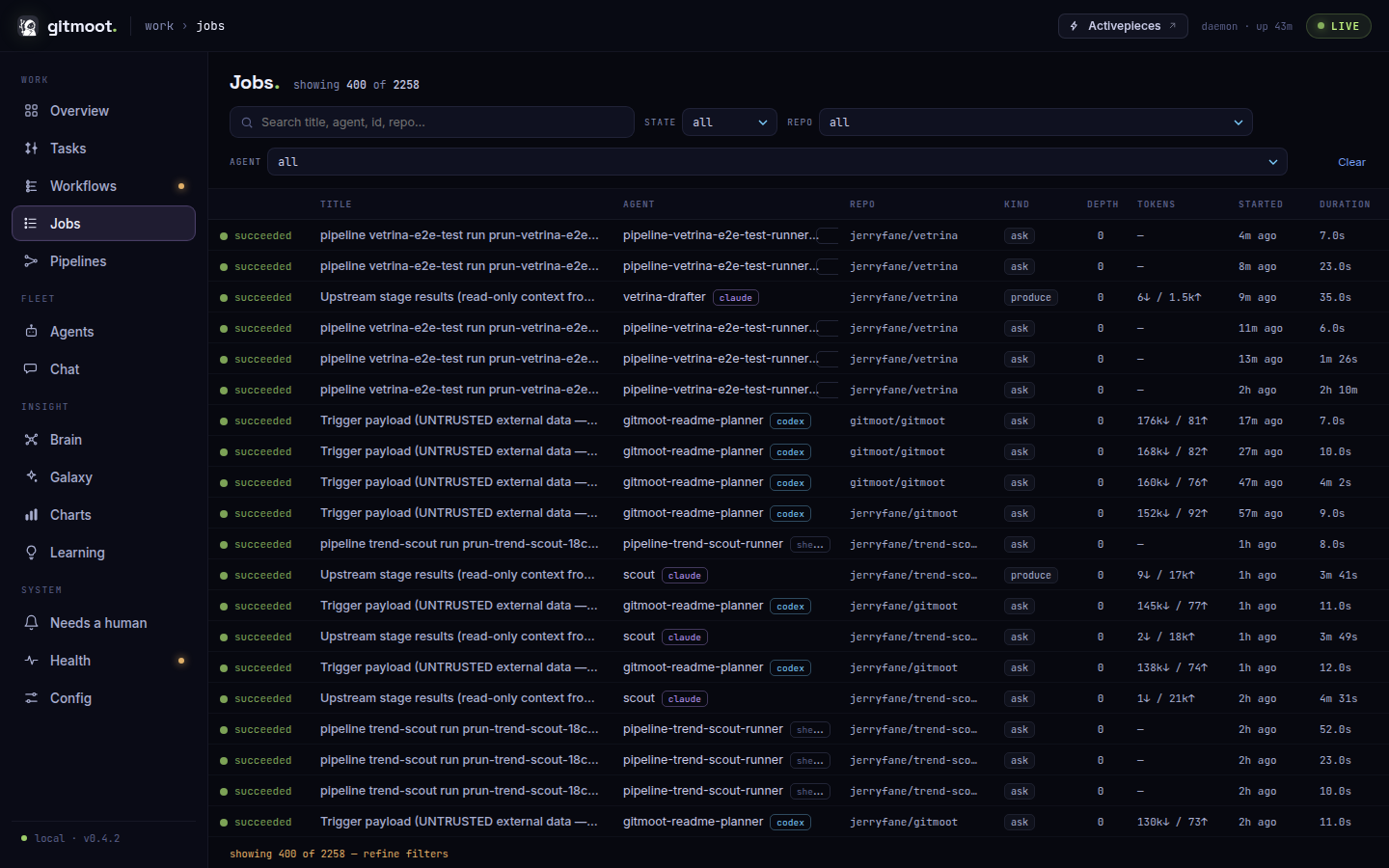
Jobs is a flat, filterable view of every job across every run, newest activity first. It renders as a table on desktop (columns: Title, Agent, Repo, Kind, Depth, Tokens, Started, Duration) and as cards on mobile.
- A search box matches over title, agent, id, and repo; facets filter by
State, Repo, and Agent (the
?agent=route pre-selects the agent facet). - The table is capped at 400 rows after filtering; when more match, a footer
reads
showing 400 of N — refine filters, and a runningshowing X of Ycount sits in the header. - Clicking a row (or card) opens a detail panel with the job's prompt, output, and event history.
Pipelines
Route: /pipelines (or /pipelines/<name>)
Pipelines is the read-only view of the declared shell-stage pipelines — the
scheduled/manual DAGs defined with gitmoot pipeline add. It is strictly
read-only: every action it surfaces is a copyable command, never a mutation.
When no pipeline is declared yet, the view shows an empty state prompting
gitmoot pipeline add <spec.yaml>.
List view — a table, one row per pipeline (columns: Name, Repo,
Enabled chip, Schedule rendered as every 24h +15m, Last run state
chip, Next due countdown rendered from the schedule as e.g. due in 6h 12m
and recomputed each poll, and a Recent outcomes strip of the last ≤10 runs as
small state-colored squares, oldest→newest left to right). Clicking a row opens
that pipeline's detail (/pipelines/<name>).
Detail view — a back link, a pipeline header (name, repo, enabled, schedule, next due), and a run-history strip of recent runs (each a chip: state color, short run id, relative time). Selecting a run (newest by default) renders that run's stage DAG and, when the run parked, a banner:
- a blocked run shows an amber banner with the halt stage, halt reason, the
outstanding needs, and a copyable
gitmoot pipeline resume <run-id>; - a failed run shows a red banner with the halt reason and a copyable
gitmoot report bug --job <failing-stage-job-id>.
The stage DAG lays stages out in dependency (depth) columns, left to right,
edges following the spec's needs. Each stage chip shows its id, state, attempt
(when it retried), elapsed time, and a one-line summary; pending and skipped
stages render dimmed. Clicking a stage opens a side panel: stages with a job show
the full job detail (prompt, output, events) fetched from /api/job/<id>; a
pending or skipped stage (no job yet) shows a minimal card with its id, state,
command, and dependencies. An in-flight run's stages flip live as the dashboard
polls (every 12s).
The detail view also fetches /api/pipelines/<name> for the pipeline's full
history and declared shape. It shows a run-history table — one row per run
(newest-first, capped at the last 100), with started time (absolute and
relative), trigger, state chip, duration, and halt stage — where selecting a row
drives the strip, matrix, and DAG together. A stage×run matrix places the
stages down the rows (declared order first, any history-only ids appended) and
the most recent runs across the columns oldest→newest, each cell a
state-colored dot, so a stage that keeps failing reads as a streak across a row;
clicking a cell selects that run. When the pipeline has a schedule, an
upcoming card projects the next few fire times from next due + k × interval
(with the jitter suffixed when set); a disabled schedule shows paused and a
manual-only pipeline shows the copyable gitmoot pipeline run <name>. A pipeline
that has never run renders its declared DAG (every stage pending, from
the current spec) as a preview instead of a run. This detail feed is strictly
read-only and deterministic; the list rows additionally summarize each pipeline's
recent success rate and average duration.
Workflows
Route: /workflows (index) and /workflows/{label} (mission log)
Workflows are labeled campaigns of related work driven by a coordinator: jobs
dispatched with --workflow <label> plus the journal written with
gitmoot workflow note. Labels may carry one namespace slash
(fable/dashboard-redesign) — by convention the coordinator's herdr pane name
namespaces the campaign. The Workflows page lists only explicitly labeled
workflows. Unlabeled jobs remain visible on the Jobs page, while pipeline runs
live on the Pipelines page. An explicitly labeled workflow still appears here
even when its label begins with pipeline/ or adhoc/.
The overview's advisory unlabeled-job item is shown for repositories under the
default enabled auto policy; it is hidden only for repositories that opt out
with require_workflow = false. Doctor keeps its drift diagnostic always-on and
advisory so historical/session rows remain visible without changing dispatch
enforcement.
When auto labeling is enabled, generated labels use the
adhoc/<agent>-<yyyy-mm-dd> convention. They remain ordinary workflow labels;
a dedicated adhoc-bucket presentation is intentionally out of scope.
The index groups every known explicit workflow by derived lifecycle: stalled
pinned on top ("needs a look"), then active, recent, and settled.
Active means work is currently running or queued. Recent means no work is live,
but a job or journal note touched the workflow within the last 30 minutes.
The workflow API exposes a stable description and live status separately.
Gitmoot auto-seeds description from a referenced local issue title, the
kickoff-note sentence, or the label campaign. The bundled frontend continues to
receive the compatibility summary field until its separate rendering follow-up
adopts the two new fields.
A workflow is stalled only when a failure has gone unacknowledged — nothing
is running, the goal was not reached, and neither a journal note from anyone but
the daemon nor a merged-PR daemon receipt has landed since the last failure
(a failure alone is not an alarm; the silence after it is; other daemon receipts
such as opened or closed never acknowledge). Stalled entries age into
settled history after a day of silence.
The detail page reads as a mission log: journal notes and run trees
interleaved in reverse-chronological order — the coordinator's intent next to
the runs it produced. Run blocks expand inline to their child jobs; a
"view as graph" link opens the classic per-run node graph as a drill-down.
The detail API carries description, status, and coordinator identity (author,
herdr pane, session id). A stalled workflow shows a go-here card with the pane,
the session id, and a copyable resume command — the dashboard tells you where
to intervene; it never intervenes itself. Override description with gitmoot workflow describe <label> "<text>"; legacy workflow note --summary is an
alias. Linked PR transitions add [auto:pr:...] notes as daemon and update
status automatically; workflow note --status is the manual escape hatch.
Inside Herdr, omitted pane/session/workdir flags are detected from the current
pane. The resume command is shown only when the stored session id is a full
UUID; legacy shortened values remain visible in the workflow index but cannot
produce a broken command.
Agents
Route: /agents (or /agents/<name>)
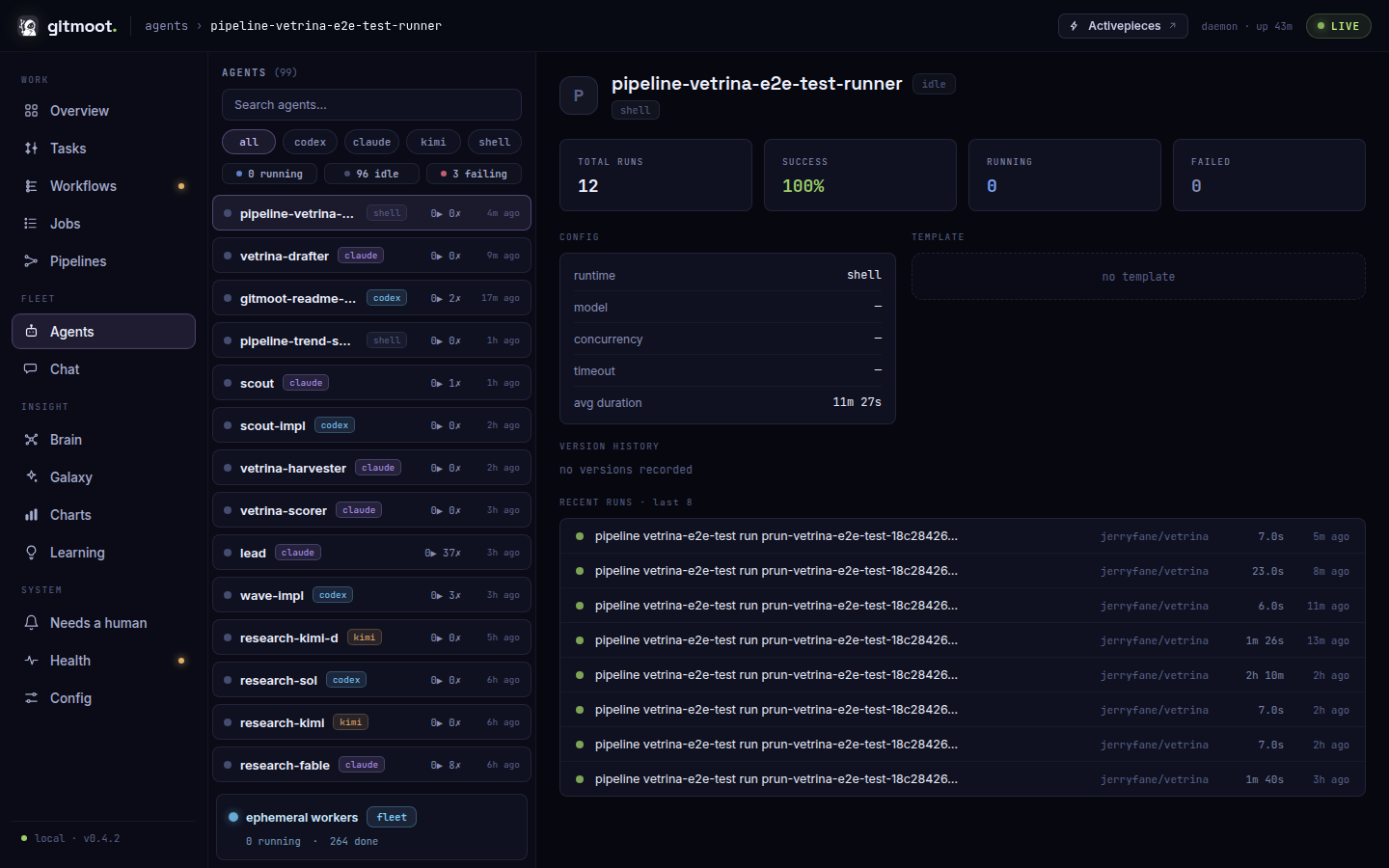
Agents is a grid of cards — one per registered agent, plus a single rollup card for the fleet of ephemeral workers. Each card shows the agent's runtime, role, model, repo scope, and job tallies (total, running, succeeded, failed) with its last-active time.
Clicking a card opens the agent detail (/agents/<name>):
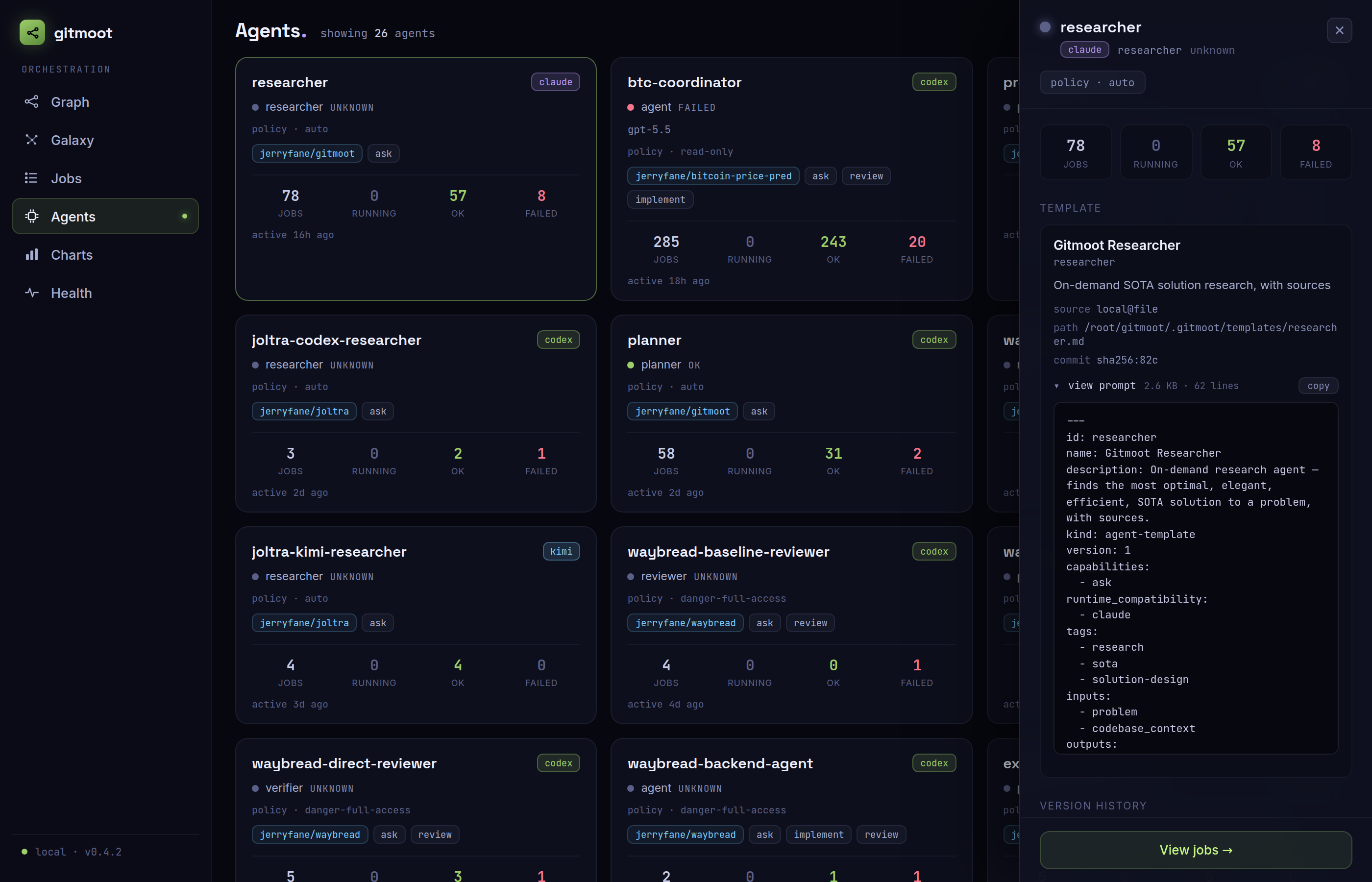
- Template card — the agent's template identity (name, description, source repo/ref/path, resolved commit) and the full prompt viewer: the exact resolved prompt body an agent runs, with a copy button.
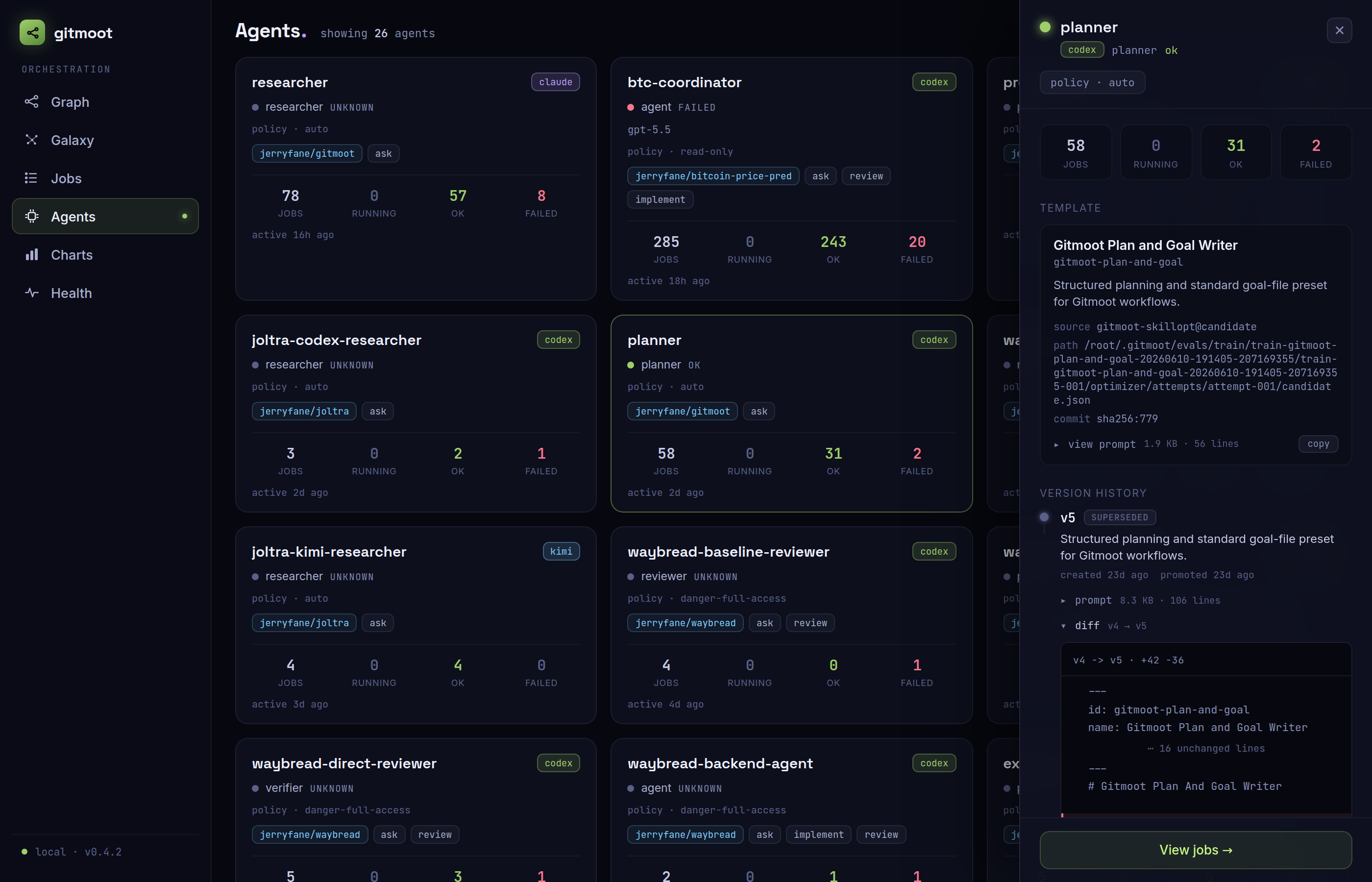
- Version history — every template version, newest first, with the version Gitmoot currently resolves to marked. Each version carries its own full prompt and a collapsed-by-default diff toggle that shows a unified diff against its predecessor version (long unchanged runs collapse to their first and last few lines):
Charts
Route: /charts
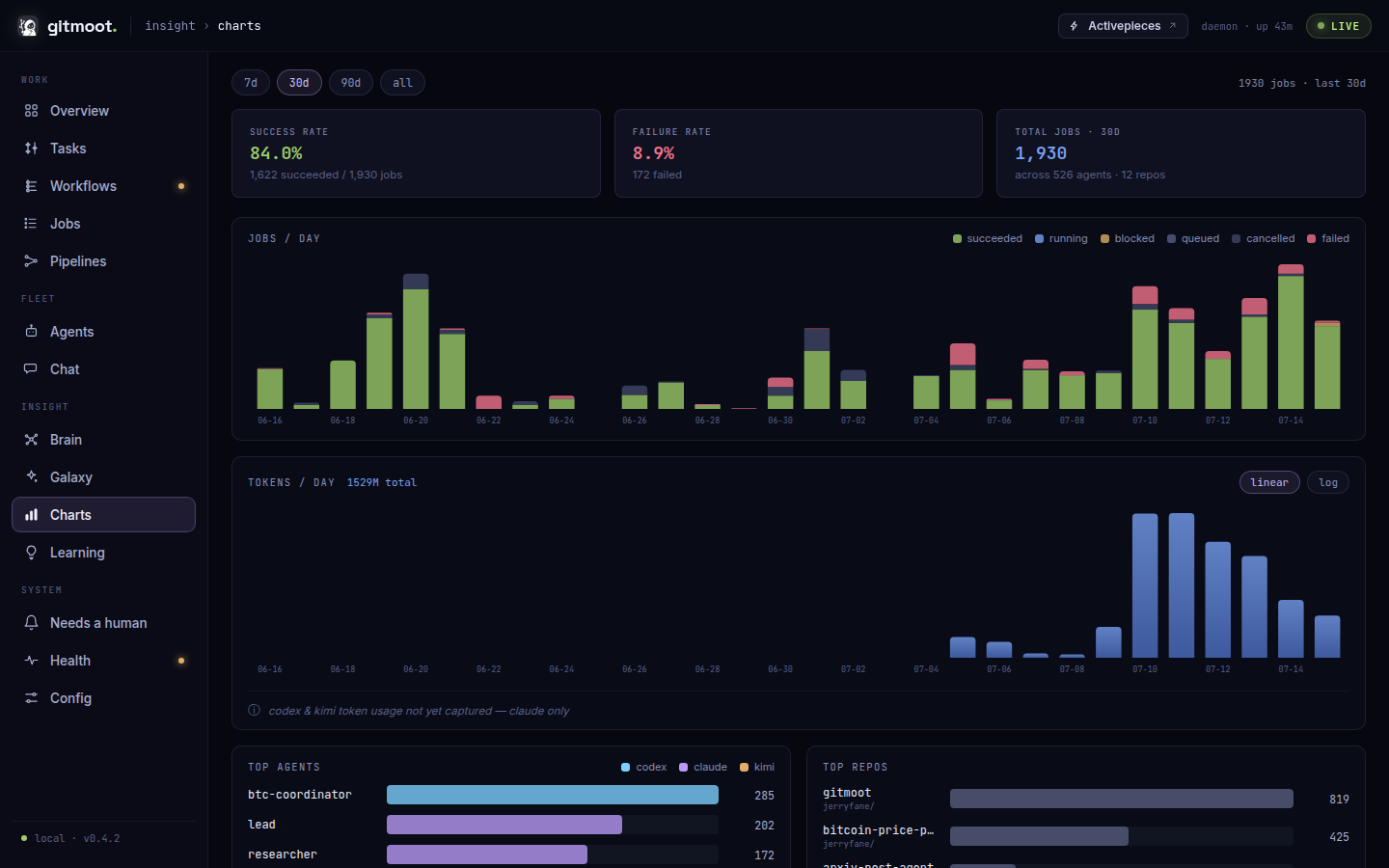
Charts summarizes activity over a selectable window — 7d, 30d, 90d, or all history (default 30d):
- Jobs per day, stacked by state (succeeded, failed, cancelled, blocked, queued, running), zero-filled continuously across the range.
- Tokens per day (input and output).
- Top agents and Top repos by job count (each capped at the busiest 12).
The series and totals reflect the selected range and refresh on the standard 12s cadence.
Health
Route: /health
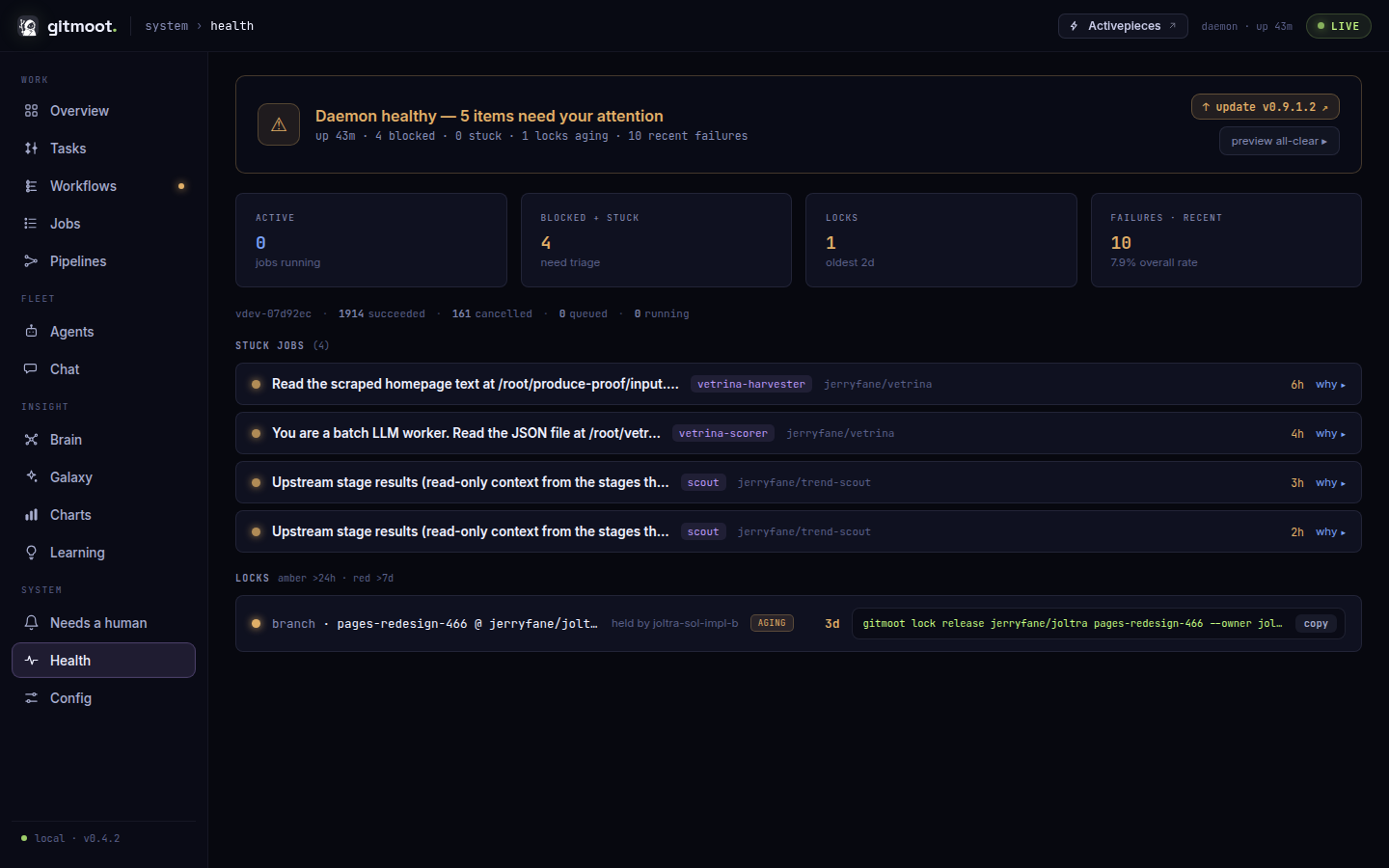
Health is the operability view for unattended runs:
- Daemon — running/stopped, PID, uptime, the running binary's version, and an
update chip (
up to date, orupdate available: <version>linking to the release). In/api/health,daemon.versionSourceisrecordedwhen the running version came from daemon startup metadata. A daemon started by an older gitmoot reportsunknownwith an emptydaemon.version; clients must treat that as neither build skew nor healthy agreement. - State totals — a chip per state (queued, running, blocked, succeeded, failed, cancelled).
- Delegation worktrees —
/api/healthreports aworktrees.summaryline (N stale worktrees / X GB) plus reclaimable, pinned, unproven, and recent-terminal counts, quarantined cleanup obligations, and exact bytes. - Stuck jobs — blocked jobs (surfaced at any age) plus queued jobs older than 10 minutes, each with a derived why-stuck reason (from the job's latest reason event and any resource lock it is waiting on) and how long it has been wedged.
- Locks — branch/checkout locks (
repo@branch, owner, acquired time) and non-branch resource locks such as runtime sessions (key, owner, acquired, expires). - Recent failures — the ten newest failed jobs.
A blocked job stays blocked until you clear it or a sweep does. Use
gitmoot job cancel <job-id> to abandon one, or gitmoot job cancel --state blocked to clear a backlog; set [orchestrate].blocked_ttl to sweep old blocked
jobs automatically, and run gitmoot doctor for the environment preflight that
warns about a blocked-job pileup. All of these are documented under
Jobs And Locks.
Needs a human
Route: /attention
Needs a human is the fleet-wide roll-up of everything parked on an explicit human decision — the one place to see what is waiting on you, grouped by the action required. Three buckets:
- Blocked job gates — jobs blocked on a human-satisfiable gate (a
--needrecorded against the job). Each row carries the job's title, agent, repo and PR, the exact need, and how long it has been waiting. Clear one withgitmoot job gates clear <job-id> --need "<need>". Expand a row to see that job's failed result checks — the deterministic checks its result failed, each with the question asked and the evaluator's explanation, plus the home-wide[workflow] result_checkspolicy in force (warnorblock). Human approval stays explicit for these ambiguous or high-stakes evaluator outcomes: the view surfaces them and links to the action, but nothing is auto-approved.
The failed-check payload backs the planned Slack/media bridge
(#519), which needs compact
human-action status to post into a thread. A read-only endpoint exposes it for
bridge consumers: GET /api/job/{id}/checks (a job's failed result checks +
policy mode). GET /api/run/{id}/verdicts still answers for interface
compatibility but always returns zero verdicts since #1752.
Comms
Route: /comms (or /comms?note=<id> to open a specific note)
Comms is the read-only operator view of the shared message inbox. Conversations use durable thread IDs, with optional workflow association. Ordinary messages, escalations, directives and review/system notices appear together; open formal obligations remain discoverable and sort before closed traffic. Notification submission and task lifecycle have separate labels. Review notices show their source job, repo, PR, exact head and purpose.
Message bodies are operator-visible here. Deep links select the original message
even when it is outside the ordinary history window. Search, role, resolution,
date and engine-marker filters do not mutate messages. Resolve escalations with
gitmoot message resolve; directive lifecycle actions use message directive.
Config
Route: /config
The read-only effective-configuration viewer. Every known knob is listed by
config section with its current value, its default, and a default /
overridden badge (overridden values stand out); boolean feature flags render
as ON/OFF chips, and any that are off by default are gathered
into a highlighted section at the top so you can see at a glance what is
enabled on this install. Below the knobs, a per-agent table shows each
registered or configured agent's runtime, model, capabilities, autonomy
policy, and background-job cap. A
filter box narrows by key, section, or value, and every knob carries a
click-to-copy key = value snippet for pasting into config.toml, whose path
and last-modified time are shown in the footer.
The Keychain section is a names-only registry view: it shows the configured keychain path and live file status, each registered key's injected/proxied mode, configured proxy upstream and auth placement, and sorted consumer grants. It never returns credential values or value-derived data; file rotation and drift are reflected on the next request.
Values come from a strict server-side allowlist: only known, registered
settings are ever serialized, so secrets and tokens can never appear. Keys
present in config.toml that the allowlist does not recognize are listed by
name only, without values. The page never edits anything — configuration
changes happen in config.toml on the box.